Handling pointer events in custom controls
The S60 platform passes touch events to applications by calling CCoeControl::HandlePointerEventL.
The application that receives these events is the one that owns the window.
While this method has been available since S60 3rd Edition, it previously
has been an optional method. If you have derived a custom control from CCoeControl,
then you must implement the HandlePointerEventL method.
Otherwise, your application cannot react to the touch events passed to it.
You have to implement at least CCoeControl::HandlePointerEventL into
your own custom UI components. If you have a container control that owns other
controls, you have to remember to call the base class implementation of CCoeControl::HandlePointerEventL() before
your additional code as illustrated below.
void CMyContainerControl::HandlePointerEventL()
    {
    // Remember to call base class implementation
    CCoeControl::HandlePointerEventL();

    // Your additional code here
    // ...
    }
The following figure illustrates changes in code for S60 5th Edition. Items marked with a black frame indicate usage of features in earlier editions, and items marked with a red frame are new features.
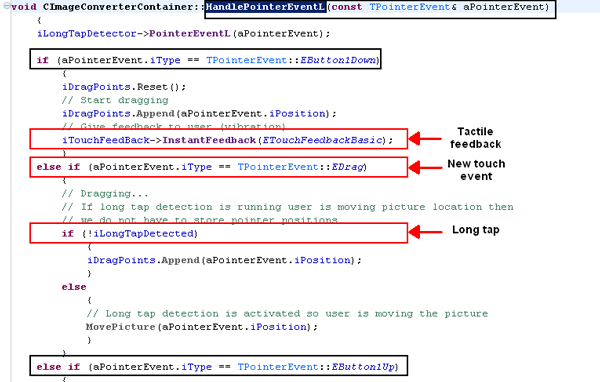
Figure: CCoeControl::HandlePointerEventL usage in S60
5th Edition
To handle pointer events in your custom control:
In your custom control header file, include the
CCoeControl::HandlePointerEventLmethod.public: // from CCoeControl void HandlePointerEventL(const TPointerEvent& aPointerEvent);In your custom control, implement the
CCoeControl::HandlePointerEventLmethod.void CMyControl::HandlePointerEventL(const TPointerEvent& aPointerEvent) { switch( aPointerEvent.iType ) { case TPointerEvent::EButton1Up: { // Is the pointer position on this component? if (Rect().Contains(aPointerEvent.iPosition)) { SetFocus(ETrue); // Tell container control that this is focused control CMyContainerControl* parent = static_cast<CMyContainerControl*>(Parent()); parent->SetLastFocusedControl(this); } break; } default: { break; } } }By default, the S60 platform only passes
EButton1DownandEButton1Upevents toHandlePointerEventL. In order to enable drag events, see Enabling additional touch events for your application.In your custom container control header file, include the
CCoeControl::HandlePointerEventLmethod.void HandlePointerEventL(const TPointerEvent& aPointerEvent);
In your custom container control, implement the
CCoeControl::HandlePointerEventLmethod.void CMyContainerControl::HandlePointerEventL(const TPointerEvent& aPointerEvent) { // Check if touch is enabled or not if( !AknLayoutUtils::PenEnabled() ) { return; } // Remove last focus if (iLastFocusedControl) { iLastFocusedControl->SetFocus(EFalse); } // Call base class method, that forwards pointer event the right child // component CCoeControl::HandlePointerEventL(aPointerEvent); // Check all button up cases again if (aPointerEvent.iType == TPointerEvent::EButton1Up) { // Find which control was focused / received pointer event CCoeControlArray::TCursor cursor = Components().Begin(); CCoeControl* ctrl = NULL; TInt counter = 0; while ((ctrl = cursor.Control<CCoeControl>()) != NULL) { if (ctrl->Rect().Contains(aPointerEvent.iPosition)) { // Set focused index for the scroll bar iFocusedIndex = counter; break; } cursor.Next(); counter++; } } // Do drawing UpdateScrollBarFrameL(); DrawNow(); }Note: For information on the
PenEnabledmethod, see Checking for touch support at runtime.
Features introduced by S60 5th Edition:
Optional
TPointerEvent::EDragfor receiving events indicating that a mobile device user is dragging it across the screenFor more information on this and other touch event options, see Enabling additional touch events for your application.
Optional
MTouchFeedbackobserver for sending a vibration when a mobile device user touches a control with the feedback interfaceFor more information on tactile feedback, see Tactile feedback.
Related information
- Enabling additional touch events for your application
- Providing tactile feedback
- Handling key events in your application