Designing application UIs for both touch and non-touch devices
When implementing S60 applications for both touch and non-touch devices, verify the functionality of the application in both touch UI and non-touch UI. There will be S60 based products for both categories.
You need to verify that when AknLayoutUtils::PenEnabled() returns EFalse, all touch specific UI controls are removed. Therefore, you must offer mobile device users a way to navigate the phone and use the applications through legacy controls (such as the Options menu). Some devices, such as the Nokia N97, have both touch UI and a keyboard in the same device, and therefore the variation is done at runtime.
Note: You can test your application's functionality in a non-touch UI using the QVGA layout in the emulator delivered with the S60 5th Edition SDK.
To check for touch support at runtime, use the method AknLayoutUtils::PenEnabled(). For implementation information, see Checking for touch support at runtime.
Note: AknLayoutUtils::PenEnabled() is supported from S60 3rd Edition, FP1, onwards.
The fundamental working assumption should be to avoid hiding fundamental navigation behind controls that are initiated or controlled by pointer events. Since non-touch products and their screen drivers do not provide these events, the corresponding navigation tasks must be found elsewhere in the UI.
The following touch UI specific controls do not work (no access) with non-touch hardware. The other S60 UI components can be used for both touch and non-touch devices.
| UI component | Example image | API or event |
|---|---|---|
Fixed Toolbar and generic buttons without focus |
 |
Toolbar API and Generic button API |
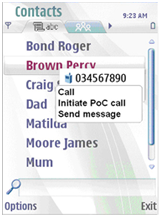 |
Stylus Pop-up Menu API | |
Long-tap events |
Touch UI utilities API |