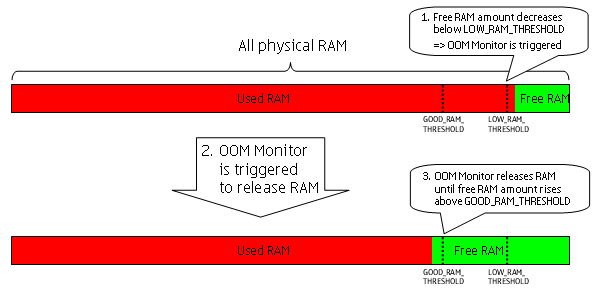
Figure 1: Overview of the OOM Monitor Functionality
This section provides you with an overview of the Out of Memory Monitor Client API features.
The basic function of the OOM Monitor is to monitor the amount of free
RAM in the mobile device. Whenever the amount of free RAM decreases below
a defined LOW_RAM_THRESHOLD threshold value, the OOM Monitor
is triggered and it releases RAM by closing applications running on background
in order to raise the amount of free RAM above a defined GOOD_RAM_THRESHOLD treshold
value. These two configurable thresholds (LOW_RAM_THRESHOLD and GOOD_RAM_THRESHOLD)
exist to provide a hysteresis and thus ensuring sufficient amount of free
RAM in the mobile device.
Figure 1: Overview of the OOM Monitor Functionality
Whenever the amount of free RAM decreases below LOW_RAM_THRESHOLD the OOM
Monitor releases RAM by closing applications which are not deemed to be in
connection with the active applications. This process is called as
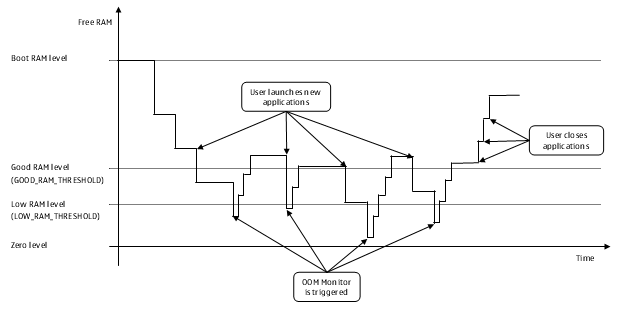
Figure 2: OOM hysteresis in a normal RAM rotation.
The OOM priority
When releasing RAM the OOM Monitor uses priorities to determine the order of closing the applications. Each application is assigned with a priority which determines the order (in relation to other applications) of closing the application.
A
The OOM Monitor closes the lowest priority application first (as this will have the smallest impact on the user), then the second lowest, etc. until the amount of the free RAM has risen above the GOOD_RAM_TRESHOLD value.
If two or more applications have the same priority the OOM Monitor closes these applications based on their idle time (i.e. the time the application has stayed idle in the background) in the following order:
The priority of each internal and 3rd party S60 application is defined in the OOM Monitor configuration file which is set up for each device.
3rd party applications can use he following priorities:
Normal (the DEFAULT priority)
HighBusy (the "infinite" priority)
By default 3rd party applications' priority is Normal but
any 3rd party application can change its own priority by using the Out of
Memory Monitor Client API.
The OOM Monitor can never close a foreground application. For this reason
it can be said that the priority of the foreground application is Busy.
The mobile device user can also define the Busy priority
for background applications which means that those applications are never
closed by the OOM Monitor.
Dynamic rules for changing the priority
The OOM Monitor configuration file can contain rules which determine how the OOM Monitor changes the priority of one or many applications. The changing of the priority is based on two following issues:
Changing the priority with OOM Monitor Client API
An application can change its OOM priority by calling the OOM Monitor Client
API's void SetOomPriority() method. For more information,
see allowing an application to protect
itself from closing by the OOM Monitor.
Characteristics of void SetOomPriority(TOomPriority aPriority) method's TOomPriority parameter
values
EOomPriorityNormal:
EOomPriorityHigh:
high priority has been
a long time idle in the background the OOM Monitor automatically decreases
its priority to normal, preventing it from consuming the
RAM unnecessarily
EOomPriorityBusy:
busy to high or normal by
itself as soon as the background task is complete and the application becomes
idle in the background. The priority can be decreased to
high with SetOomPriority(EOomPriorityHigh) method
call
normal with SetOOMPriority(EOomPriorityNormal) method
call
The OOM Monitor Client API is meant to be used in the following two cases:
By using the OOM Monitor Client API an application can dynamically change its priority for that period of time when an active task is ongoing in the background.
A network service providing application cannot be closed, otherwise the service will stop.
normal priority
A 3rd party application cannot be included in the OOM configuration file but it can change its OOM priority with the OOM Monitor Client API.
To avoid a situation where the free RAM would run out because applications
allocated the RAM faster than the OOM Monitor released it, the OOM Monitor
has the KOomMaxAllocationWithoutPermission constant. It defines
the maximum amount of RAM that an application can safely allocate within two
seconds without first asking permission from OOM Monitor.
The KOomMaxAllocationWithoutPermission value defined in
the OOM Monitor header file will not be decreased in the future, so allocating
not over KOomMaxAllocationWithoutPermission amount of RAM
is safe. The RAM can be allocated quickly in small pieces as long as the total
amount of allocated RAM within two seconds is less than KOomMaxAllocationWithoutPermission.
Out-of-RAM error in normal RAM rotation
An application should always be prepared for an out-of-RAM error because it can still occur for example in the following situations:
KOomMaxAllocationWithoutPermission amount
of RAM within two seconds without asking the permission and the OOM Monitor
cannot release the RAM fast enough for the application.
KOomMaxAllocationWithoutPermission amount
of RAM within two seconds but
The use cases for the Out of Memory Monitor Client API demonstrate how to
The Out of Memory Monitor Client API consists of ROomMonitorSession class
whose class definition is as follows:
class ROomMonitorSession : public RSessionBase
ROomMonitorSession class
has
TOomPriority // Defines the application priorities (normal, high,
and busy) of the OOM monitor
RequestFreeMemory () // Requests the OOM monitor to free
RAM
SetOomPriority () // Sets the application priority of
the OOM monitor
